The Complete Guide to Fuzzy Matching: When Close Enough is Perfect

Ever wondered how Google corrects "Mikrosoft" to "Microsoft" or how Spotify finds your favorite song even when you butcher the title? The secret lies in fuzzy matching – the computational wizardry that makes "close enough" perfect.
What is Fuzzy Matching?

In a perfect world, every database entry would be pristine, every user input would be flawless, and every search query would be exactly what we intended. Reality, however, is messier. Typos happen, data gets corrupted, and users make mistakes. This is where fuzzy matching comes to the rescue.
Fuzzy matching (also known as approximate string matching) is a computational technique that finds strings which match a given pattern approximately, rather than exactly. Instead of demanding perfect matches, fuzzy matching algorithms calculate the likelihood that two strings represent the same entity, even when they contain differences.
Real-World Applications
Fuzzy matching powers numerous applications you interact with daily:
Search engines correcting your typos
Email systems preventing duplicate contacts
Banking detecting potential fraud through name matching
E-commerce finding similar products
DNA sequencing in bioinformatics
Plagiarism detection in academic software
Master data management in enterprise systems
[Image Placeholder: Infographic showing various fuzzy matching applications across different industries]
The Mathematics Behind the Magic
At its core, fuzzy matching relies on edit distance metrics – mathematical measures that quantify how different two strings are by counting the minimum operations needed to transform one string into another.
Think of it like this: if you wanted to change "cat" to "bat", you'd need exactly one operation (substitute 'c' with 'b'). The edit distance is 1, indicating these strings are very similar.
Essential Fuzzy Matching Algorithms
1. Levenshtein Distance: The Gold Standard
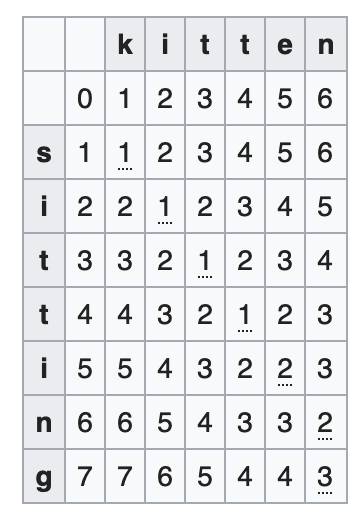
The Levenshtein distance is the most widely used edit distance metric. It counts the minimum number of single-character edits (insertions, deletions, or substitutions) needed to transform one string into another.
Mathematical Foundation
For strings A and B, the Levenshtein distance follows this recursive formula:
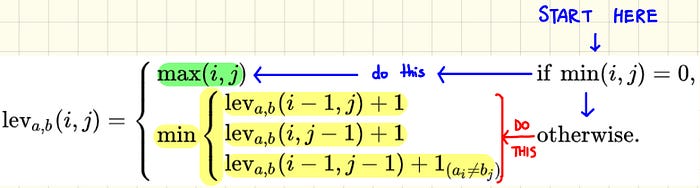
lev(i,j) = max(i,j) if min(i,j) = 0
lev(i,j) = min(
    lev(i-1,j) + 1,      // deletion
    lev(i,j-1) + 1,      // insertion
    lev(i-1,j-1) + cost  // substitution
) otherwise
Where cost = 0 if characters match, 1 if they don't.
Python Implementation
def levenshtein_distance(s1, s2):
    """
    Calculate the Levenshtein distance between two strings.

    Args:
        s1, s2 (str): Input strings to compare

    Returns:
        int: Edit distance between the strings
    """
    if len(s1) < len(s2):
        return levenshtein_distance(s2, s1)

    if len(s2) == 0:
        return len(s1)

    # Create a matrix to store distances
    previous_row = list(range(len(s2) + 1))

    for i, c1 in enumerate(s1):
        current_row = [i + 1]
        for j, c2 in enumerate(s2):
            # Calculate cost of operations
            insertions = previous_row[j + 1] + 1
            deletions = current_row[j] + 1
            substitutions = previous_row[j] + (c1 != c2)

            current_row.append(min(insertions, deletions, substitutions))

        previous_row = current_row

    return previous_row[-1]

# Example usage
print(levenshtein_distance("kitten", "sitting"))  # Output: 3
print(levenshtein_distance("Microsoft", "Mikrosoft"))  # Output: 1
Properties of Levenshtein Distance
Zero distance ↔ Identical strings
Minimum bound: At least the difference in string lengths
Maximum bound: Length of the longer string
Triangle inequality: Distance(A,C) ≤ Distance(A,B) + Distance(B,C)
2. Damerau-Levenshtein Distance: The Transposition-Aware Cousin
The Damerau-Levenshtein distance extends Levenshtein by adding transposition as a valid operation. This is crucial because character swapping (like "from" → "form") is a common human error.
def damerau_levenshtein_distance(s1, s2):
    """
    Calculate Damerau-Levenshtein distance including transpositions.
    """
    len1, len2 = len(s1), len(s2)

    # Create character frequency map
    char_map = {}
    for char in s1 + s2:
        char_map[char] = 0

    # Initialize distance matrix
    max_dist = len1 + len2
    H = [[max_dist for _ in range(len2 + 2)] for _ in range(len1 + 2)]

    H[0][0] = max_dist
    for i in range(0, len1 + 1):
        H[i+1][0] = max_dist
        H[i+1][1] = i
    for j in range(0, len2 + 1):
        H[0][j+1] = max_dist
        H[1][j+1] = j

    for i in range(1, len1 + 1):
        last_match_col = 0
        for j in range(1, len2 + 1):
            last_match_row = char_map[s2[j-1]]
            cost = 1
            if s1[i-1] == s2[j-1]:
                cost = 0
                last_match_col = j

            H[i+1][j+1] = min(
                H[i][j] + cost,  # substitution
                H[i+1][j] + 1,   # insertion
                H[i][j+1] + 1,   # deletion
                H[last_match_row][last_match_col] + (i-last_match_row-1) + 1 + (j-last_match_col-1)  # transposition
            )

        char_map[s1[i-1]] = i

    return H[len1 + 1][len2 + 1]

# Example demonstrating transposition advantage
print(damerau_levenshtein_distance("form", "from"))  # Output: 1
print(levenshtein_distance("form", "from"))          # Output: 2
3. Bitap Algorithm: The Speed Demon
[Image Placeholder: Diagram showing bitwise operations in Bitap algorithm]
The Bitap algorithm (also known as shift-or or Baeza-Yates–Gonnet algorithm) is designed for approximate pattern searching. It excels at finding substrings that are "approximately equal" to a given pattern using lightning-fast bitwise operations.
def bitap_search(text, pattern, max_errors=1):
    """
    Bitap algorithm for approximate string matching.

    Args:
        text (str): Text to search in
        pattern (str): Pattern to find
        max_errors (int): Maximum allowed errors

    Returns:
        list: Positions where pattern is found with <= max_errors
    """
    pattern_len = len(pattern)
    text_len = len(text)

    if pattern_len == 0:
        return []

    # Create pattern mask for each character
    pattern_mask = {}
    for i, char in enumerate(pattern):
        if char not in pattern_mask:
            pattern_mask[char] = 0
        pattern_mask[char] |= 1 << i

    matches = []

    # Initialize R arrays for each error level
    R = [0] * (max_errors + 1)

    for i, char in enumerate(text):
        old_R = R[:]

        # Calculate R[0] - exact matching
        R[0] = ((old_R[0] << 1) | 1) & pattern_mask.get(char, 0)

        # Calculate R[k] for k > 0 - with errors
        for k in range(1, max_errors + 1):
            R[k] = (
                ((old_R[k] << 1) | 1) & pattern_mask.get(char, 0) |  # Match
                (old_R[k-1] << 1) |  # Insertion
                old_R[k-1] |         # Deletion
                (R[k-1] << 1)        # Substitution
            )

        # Check if pattern is found
        if R[max_errors] & (1 << (pattern_len - 1)):
            matches.append(i - pattern_len + 1)

    return matches

# Example usage
text = "womenwhocode"
pattern = "code"
positions = bitap_search(text, pattern, max_errors=1)
print(f"Pattern '{pattern}' found at positions: {positions}")  # Output: [8]
4. N-gram Algorithm: The Context-Aware Approach
[Image Placeholder: Visual representation of n-grams being extracted from text]
The N-gram algorithm takes a different approach by breaking strings into overlapping sequences of n characters and comparing the similarity of these sequences. This method is particularly effective for longer texts and captures contextual information.
def generate_ngrams(text, n=2):
    """Generate n-grams from text."""
    return [text[i:i+n] for i in range(len(text) - n + 1)]

def ngram_similarity(s1, s2, n=2):
    """
    Calculate similarity based on n-gram overlap.

    Args:
        s1, s2 (str): Strings to compare
        n (int): Size of n-grams

    Returns:
        float: Similarity score between 0 and 1
    """
    if not s1 or not s2:
        return 0.0

    ngrams1 = set(generate_ngrams(s1.lower(), n))
    ngrams2 = set(generate_ngrams(s2.lower(), n))

    if not ngrams1 and not ngrams2:
        return 1.0

    intersection = len(ngrams1 & ngrams2)
    union = len(ngrams1 | ngrams2)

    return intersection / union if union > 0 else 0.0

# Enhanced version with multiple n-gram sizes
def multi_ngram_similarity(s1, s2, ngram_sizes=[1, 2, 3]):
    """Calculate weighted similarity using multiple n-gram sizes."""
    similarities = []

    for n in ngram_sizes:
        if len(s1) >= n and len(s2) >= n:
            sim = ngram_similarity(s1, s2, n)
            similarities.append(sim)

    return sum(similarities) / len(similarities) if similarities else 0.0

# Example usage
print(ngram_similarity("Microsoft", "Mikrosoft", 2))      # Output: ~0.73
print(multi_ngram_similarity("Microsoft", "Mikrosoft"))   # Output: ~0.85
Performance Comparison and When to Use Each Algorithm
[Image Placeholder: Performance comparison chart showing algorithm speed vs accuracy trade-offs]
| Algorithm | Best For | Time Complexity | Space Complexity | Pros | Cons |
| Levenshtein | General-purpose matching | O(m×n) | O(min(m,n)) | Simple, reliable, well-understood | No transposition support |
| Damerau-Levenshtein | Text with common transpositions | O(m×n×alphabet) | O(m×n×alphabet) | Handles transpositions | More complex, higher memory |
| Bitap | Short pattern searching | O(m×n) | O(alphabet) | Very fast for short patterns | Limited to short patterns |
| N-gram | Long text similarity | O(m+n) | O(m+n) | Good for context, scalable | Less precise for short strings |
Building a Robust Fuzzy Matching System
Here's a practical implementation that combines multiple algorithms for optimal results:
class FuzzyMatcher:
    """
    A comprehensive fuzzy matching system combining multiple algorithms.
    """

    def __init__(self):
        self.algorithms = {
            'levenshtein': self._levenshtein_similarity,
            'ngram': self._ngram_similarity,
            'combined': self._combined_similarity
        }

    def _levenshtein_similarity(self, s1, s2):
        """Convert Levenshtein distance to similarity score."""
        max_len = max(len(s1), len(s2))
        if max_len == 0:
            return 1.0
        distance = levenshtein_distance(s1, s2)
        return 1 - (distance / max_len)

    def _ngram_similarity(self, s1, s2, n=2):
        """N-gram based similarity."""
        return multi_ngram_similarity(s1, s2)

    def _combined_similarity(self, s1, s2):
        """Weighted combination of multiple algorithms."""
        lev_sim = self._levenshtein_similarity(s1, s2)
        ngram_sim = self._ngram_similarity(s1, s2)

        # Weight based on string lengths
        if min(len(s1), len(s2)) < 5:
            return 0.8 * lev_sim + 0.2 * ngram_sim
        else:
            return 0.4 * lev_sim + 0.6 * ngram_sim

    def find_matches(self, query, candidates, algorithm='combined', threshold=0.6):
        """
        Find best matches for a query string.

        Args:
            query (str): String to match against
            candidates (list): List of candidate strings
            algorithm (str): Algorithm to use
            threshold (float): Minimum similarity threshold

        Returns:
            list: Sorted list of (candidate, similarity_score) tuples
        """
        similarity_func = self.algorithms.get(algorithm, self._combined_similarity)

        matches = []
        for candidate in candidates:
            score = similarity_func(query.lower(), candidate.lower())
            if score >= threshold:
                matches.append((candidate, score))

        return sorted(matches, key=lambda x: x[1], reverse=True)

# Example usage
matcher = FuzzyMatcher()

# Sample company database
companies = [
    "Microsoft Corporation",
    "Apple Inc.",
    "Google LLC",
    "Amazon.com Inc.",
    "Meta Platforms Inc.",
    "Tesla Inc.",
    "Netflix Inc."
]

# Test queries with typos
queries = ["Mikcosoft", "Aple Inc", "Gogle", "Amzon"]

for query in queries:
    print(f"\nSearching for: '{query}'")
    matches = matcher.find_matches(query, companies, threshold=0.4)
    for company, score in matches[:3]:  # Top 3 matches
        print(f"  {company}: {score:.3f}")
Advanced Techniques and Optimizations
1. Preprocessing for Better Results
import re
import unicodedata

def preprocess_string(s):
    """
    Normalize strings for better matching.
    """
    # Convert to lowercase
    s = s.lower()

    # Remove accents
    s = unicodedata.normalize('NFD', s)
    s = ''.join(char for char in s if unicodedata.category(char) != 'Mn')

    # Remove special characters and extra spaces
    s = re.sub(r'[^\w\s]', ' ', s)
    s = re.sub(r'\s+', ' ', s).strip()

    return s

# Enhanced matcher with preprocessing
class EnhancedFuzzyMatcher(FuzzyMatcher):
    def find_matches(self, query, candidates, algorithm='combined', threshold=0.6, preprocess=True):
        if preprocess:
            query = preprocess_string(query)
            candidates = [preprocess_string(c) for c in candidates]

        return super().find_matches(query, candidates, algorithm, threshold)
2. Indexing for Large-Scale Matching
For applications dealing with millions of records, consider using indexing strategies:
from collections import defaultdict

class IndexedFuzzyMatcher:
    """
    Fuzzy matcher with n-gram indexing for large datasets.
    """

    def __init__(self, ngram_size=3):
        self.ngram_size = ngram_size
        self.index = defaultdict(set)
        self.documents = {}

    def add_document(self, doc_id, text):
        """Add document to the index."""
        self.documents[doc_id] = text
        ngrams = generate_ngrams(text.lower(), self.ngram_size)

        for ngram in ngrams:
            self.index[ngram].add(doc_id)

    def search(self, query, max_candidates=1000, threshold=0.6):
        """Search using index for faster retrieval."""
        query_ngrams = set(generate_ngrams(query.lower(), self.ngram_size))

        # Find candidate documents
        candidate_scores = defaultdict(int)
        for ngram in query_ngrams:
            for doc_id in self.index[ngram]:
                candidate_scores[doc_id] += 1

        # Sort candidates by preliminary score
        candidates = sorted(candidate_scores.items(),
                          key=lambda x: x[1],
                          reverse=True)[:max_candidates]

        # Perform detailed matching on top candidates
        results = []
        matcher = FuzzyMatcher()

        for doc_id, _ in candidates:
            text = self.documents[doc_id]
            similarity = matcher._combined_similarity(query, text)
            if similarity >= threshold:
                results.append((doc_id, text, similarity))

        return sorted(results, key=lambda x: x[2], reverse=True)
Best Practices and Common Pitfalls
Best Practices
Choose the Right Algorithm: Use Levenshtein for general purposes, Bitap for pattern searching, and n-grams for longer texts
Normalize Input: Always preprocess strings (lowercase, remove accents, handle punctuation)
Set Appropriate Thresholds: Start with 0.8+ for high precision, 0.6+ for balanced, 0.4+ for high recall
Consider Context: Combine multiple algorithms for better results
Performance Matters: Use indexing for large datasets
Common Pitfalls
Ignoring Preprocessing: Raw strings often produce poor matches
Wrong Algorithm Choice: Using character-based algorithms for word-based problems
Fixed Thresholds: One size doesn't fit all use cases
Scalability Ignorance: Not considering performance implications for large datasets
Over-Engineering: Starting with complex solutions when simple ones suffice
Real-World Case Study: E-commerce Product Matching
Let's implement a practical system for matching product names in an e-commerce platform:
class ProductMatcher:
    """
    Specialized fuzzy matcher for e-commerce products.
    """

    def __init__(self):
        self.base_matcher = FuzzyMatcher()

    def extract_features(self, product_name):
        """Extract key features from product names."""
        # Remove common stop words
        stop_words = {'the', 'a', 'an', 'and', 'or', 'but', 'in', 'on', 'at', 'to', 'for', 'of', 'with', 'by'}

        words = preprocess_string(product_name).split()
        features = [word for word in words if word not in stop_words]

        return ' '.join(features)

    def match_products(self, query, product_catalog, threshold=0.7):
        """Match products with feature extraction."""
        query_features = self.extract_features(query)

        matches = []
        for product in product_catalog:
            product_features = self.extract_features(product['name'])

            # Calculate multiple similarity scores
            name_sim = self.base_matcher._combined_similarity(query, product['name'])
            feature_sim = self.base_matcher._combined_similarity(query_features, product_features)

            # Weighted final score
            final_score = 0.6 * name_sim + 0.4 * feature_sim

            if final_score >= threshold:
                matches.append({
                    'product': product,
                    'similarity': final_score,
                    'name_similarity': name_sim,
                    'feature_similarity': feature_sim
                })

        return sorted(matches, key=lambda x: x['similarity'], reverse=True)

# Example usage
products = [
    {'id': 1, 'name': 'Samsung Galaxy S21 Ultra 5G 128GB Black', 'price': 999},
    {'id': 2, 'name': 'iPhone 13 Pro Max 256GB Space Gray', 'price': 1099},
    {'id': 3, 'name': 'Samsung Galaxy S21 Plus 5G 256GB Silver', 'price': 799},
    {'id': 4, 'name': 'Apple iPhone 13 128GB Blue', 'price': 699}
]

product_matcher = ProductMatcher()
results = product_matcher.match_products("Samsung S21 Ultra Black", products)

for result in results:
    print(f"Product: {result['product']['name']}")
    print(f"Overall Similarity: {result['similarity']:.3f}")
    print(f"Price: ${result['product']['price']}")
    print()
Future Directions and Advanced Topics
[Image Placeholder: Futuristic visualization of AI-powered fuzzy matching]
Machine Learning-Enhanced Fuzzy Matching
Modern fuzzy matching systems increasingly leverage machine learning:
Word Embeddings: Using Word2Vec, GloVe, or BERT embeddings for semantic similarity
Deep Learning: Neural networks trained on domain-specific matching tasks
Active Learning: Systems that improve from user feedback
Specialized Applications
Phonetic Matching: Soundex and Metaphone algorithms for name matching
Geographic Matching: Algorithms considering spatial relationships
Temporal Matching: Time-aware fuzzy matching for evolving data
Conclusion
Fuzzy matching is an essential tool in the modern data scientist's toolkit. From correcting typos in search engines to preventing duplicate records in databases, these algorithms make our digital interactions smoother and more intuitive.
The key to successful fuzzy matching lies in:
Understanding your data and choosing appropriate algorithms
Proper preprocessing and normalization
Balancing accuracy with performance based on your use case
Continuous refinement based on real-world feedback
Whether you're building a search engine, cleaning up messy datasets, or creating recommendation systems, fuzzy matching algorithms provide the flexibility to handle the imperfect nature of real-world data.
Ready to implement fuzzy matching in your next project? Start with the Levenshtein distance for simple cases, experiment with n-grams for longer texts, and don't forget to preprocess your data. The perfect match might just be one algorithm away!
References and Further Reading
Have questions about fuzzy matching or want to share your implementation? Drop a comment below!


